
Smart Conversation
Introduction
FeiSuan JavaAI provides smart conversation capabilities, supporting three modes: Smart Q&A, Javachat, and Smart Agent. It not only helps developers solve problems during the development process, but also features core capabilities such as intelligent code generation, multi-dimensional context association, version snapshot rollback, covering typical R&D scenarios such as requirement analysis, code optimization, and bug fixing. Additionally, it provides code interpretation, unit test generation, existing code optimization, code completion, and optimization suggestions, efficiently helping you complete development tasks.
Smart Conversation Mode Description
Smart Q&A: When encountering code-related issues during programming, you can get help using FeiSuan JavaAI's Smart Q&A feature. Whether you need code explanations, adding code comments, or generating unit tests, FeiSuan JavaAI can assist. Additionally, when encountering compilation failures and other issues, simply select the corresponding error code or error log information and start a conversation through the FeiSuan JavaAI plugin, providing your problem details.
Java Chat: Java Chat is an intelligent programming AI assistant with deep contextual awareness, providing full-process coding support to developers through natural language interaction. The system features core capabilities such as intelligent code generation, multi-dimensional context association, and version snapshot rollback, covering typical R&D scenarios such as requirement analysis, code optimization, and bug fixing.
Smart Agent: The Smart Agent possesses capabilities such as automatic execution, obtaining current project structure, and using corresponding tool calls. You only need to describe the task, and the Smart Agent will "understand" your intent. It reads your current engineering directory structure, combines engineering retrieval, file editing, file viewing, terminal operations, and other tools, automatically uses corresponding tools to complete your programming tasks, fully fitting developers' workflow and actual scenarios. Without requiring you to select associated contexts, the Smart Agent will automatically identify corresponding files and use tools to complete your tasks.
Create Smart Conversation
- Click the new icon in the upper right corner to create a new conversation
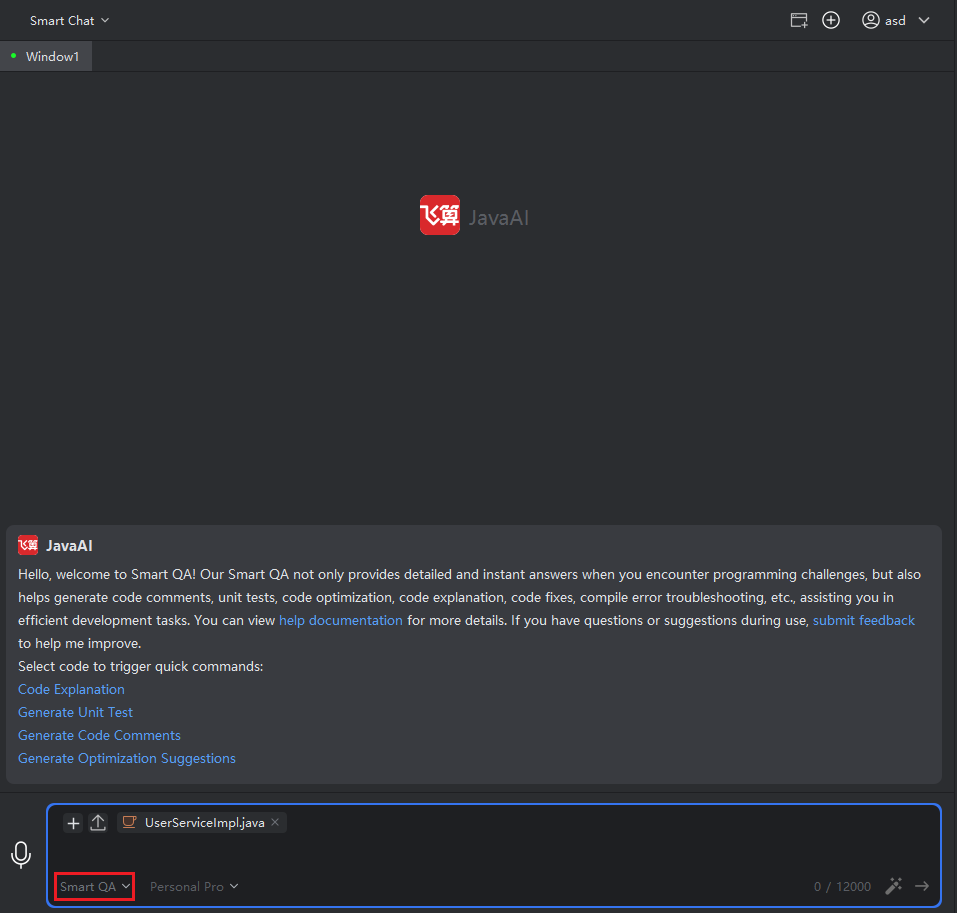
- You can freely switch smart conversation modes at the lower left corner of the input box, then enter the requirement description.
Feature Overview
- Structured Requirement Input: Please clearly indicate the specific programming task or goal you wish to accomplish. For example, whether you need to implement a new functional module or optimize existing code, you can describe it in text. The recommended format for description is in steps, with more detail being better.
- Context Association Matrix: Provide any information context that helps understand the task. Java Chat will optimize based on the context combined with requirement descriptions. You can also attach relevant code snippets or entire code files, allowing Java Chat to provide improvement suggestions or fixes directly based on actual code. For complex issues involving multiple files, providing a complete project structure view is more comprehensive.
- View and Manage Code Changes: After Java Chat generates code content, you can carefully review these changes through the change comparison view, making decisions to accept, reject, or further modify local code snippets, ensuring the final result meets expected code outcomes.
- Multi-file Modification: When Java Chat modifies multiple code files within an engineering project, each file's modification will go through at least a generation and application process. During the generation of code changes, you can see related changed files and their corresponding statuses in both Java Chat's response cards and workspace.
- Multi-round Conversation: After one round of conversation and generation of code change files, if you need to continue supplementing requirements or modifying requirements, you can continue asking questions in the current task's conversation flow. Java Chat will combine previously generated code changes with supplementary requirements and generate new code modification suggestions, producing one or more new code change files.
- View Snapshots and Version Rollback: When Java Chat-generated code fails to meet expectations or your requirements change, you can use the snapshot function to roll back to previous conversation states and code versions, continuing to ask questions from there and adjust requirements.
- Error Troubleshooting: After clicking this button, FeiSuan JavaAI will combine running code, exception stack, and other error context information to quickly provide troubleshooting ideas or repair suggestions in the Smart Q&A area. This approach helps you efficiently locate problems and take swift measures for correction, significantly improving debugging efficiency and code quality.
- Using Terminal Commands: When you don't know how to write execution instructions or don't understand the meaning of certain commands, you can wake up the #Terminal Command# in the Smart Q&A window by typing #, then use natural language to describe your command needs, and Smart Q&A will generate the required commands.
- Generate Git Commit Messages: Generate git commit messages by intelligently analyzing file changes, automatically generating descriptive summaries for each modification. No manual filling is required, simplifying the commit process, ensuring clear and consistent commit logs, and improving team collaboration efficiency.
- Tools: The Smart Agent provides over ten programming tools for agent use, including file search, file reading, directory reading, semantic symbol retrieval within the project, file modification, error acquisition, terminal execution, etc. During tool usage, the Smart Agent can execute corresponding tools without developer confirmation or intervention, outputting the results after tool execution. You can also describe to let the Smart Agent execute which tools to complete what requirements.
- Memory: The Smart Agent actively remembers your conversations with the agent, automatically categorizes, organizes, and analyzes related questions, gradually forming rich memories related to individual developers, projects, and issues. At the same time, you can proactively ask the Smart Agent to remember your coding style, habits, preferences, etc., then in subsequent programming tasks, it can better align with your style preferences, making the entire project style consistent.
View History
The conversation history function helps you save and manage all historical conversations. Through it, you can easily find and revisit previous sessions, reviewing past discussion content. Historical conversations contain records of Smart Q&A, Java Chat, and Smart Agent. You can select the desired view according to the title, and you can quickly search for corresponding records using search fields or time.