Configure Manual Updates
Introduction
When configured to manual update mode, if there is a new version released, you can choose whether to update to the latest version. If you choose not to update, you can still continue using the current version. However, please note that if you receive a prompt message saying "Current version is too low, please update to the latest version", it indicates that there is a mandatory new version that must be updated. In this case, the content of the new version is incompatible with the old version, and you need to upgrade to continue using it. However, please rest assured that this process will not affect your existing data and operations.
Manual Update
- Click the upper left corner of the IDEA tool "File > Settings > FeiSuan JavaAI > Update Settings, select manual update to new version, then click "OK"

- When there is a new version, the lower right corner will prompt that there is a new version, click "Download Update",

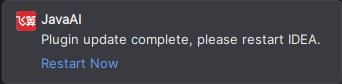
- After update is complete, restart IDEA to take effect.