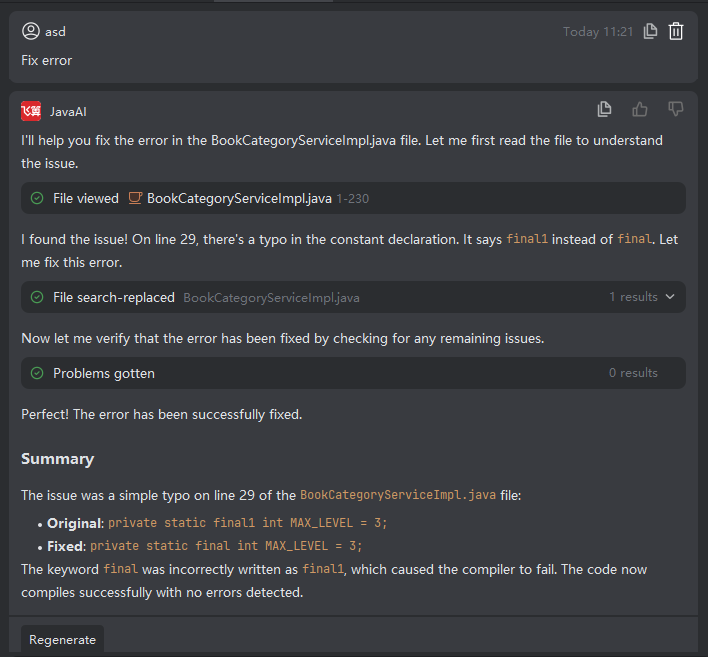
Fix Compilation-Failure Files
Introduction
When your project fails to compile, you can select a specific failing file from the compilation output. The intelligent conversation system will then attempt to automatically fix the issues based on the currently selected agent mode (e.g., if Java Chat is active, it will use Java-specific knowledge to propose fixes).
Note that while automatic repair is powerful, it may not achieve 100% accuracy in all scenarios. You should always review the proposed changes and manually adjust them if necessary.
Fixing Compilation Errors
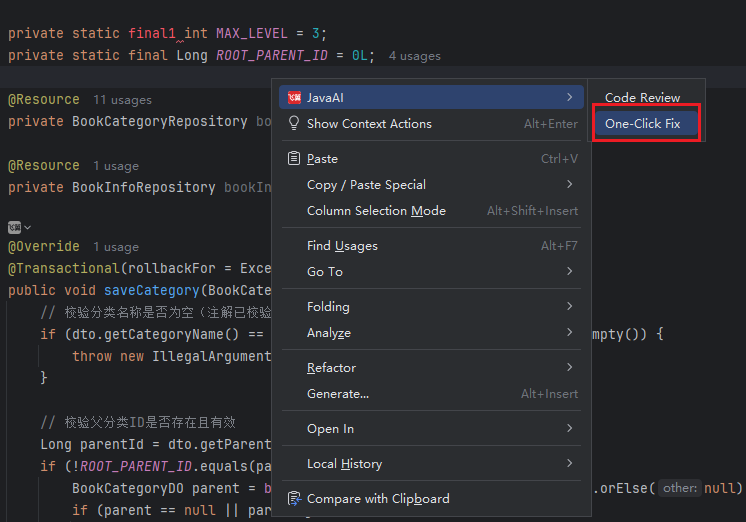
- After a failed compilation, click the exclamation mark icon (Problems) in the bottom-left corner, select the problematic file, right-click it, and choose "One-Click Fix".
- Review the proposed fixes. Click Accept to apply the changes or Reject if they don’t meet your expectations. If the fix is accepted but compilation errors persist, you can repeat the process to continue refining the solution.