Tools
Introduction
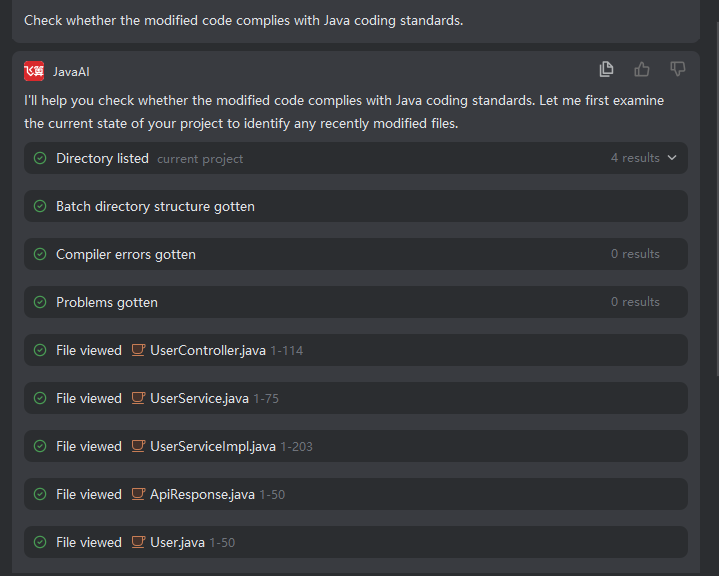
The intelligent agent provides more than ten programming tools for the agent to use, including file search, file reading, directory reading, semantic symbol retrieval within the project, file modification, error acquisition, terminal execution, etc. During the process of using tools, the agent does not require developer confirmation or intervention, can execute corresponding tools by itself, and output the results after executing corresponding tools. You can also let the agent execute which tool to complete what demand by describing.
Tool Details are as follows
| Name | Description |
|---|---|
| Search Repository | Perform current project search through semantic retrieval. |
| Search Files | Search files within the current project. |
| Search Code | Search code within the current project. |
| Search Symbols | Search symbols within the current project. |
| View Directory | Search and view project directories within the current project. |
| Modify File | Modify a code file. |
| View File | View the content of a code file. |
| Run Command | Run terminal command. |
| Get Terminal Output | Get terminal output after running command. |
| Get Issues | Get code issues within the current project (content in Problem window). |
| Create Memory | Create memories related to requirements proposed by developers. |
| Get URL Content | Get specified URL content |
| Get Project Compilation Errors | Get error information after project compilation |
| Batch Recursive Get Directory Structure | Batch get what the current project's directory structure is, like tree structure |
| Search Replace File | Replace string content in files that need to be modified |
| Read File Tail | Reads the end of the file and returns the content corresponding to the specified number of lines from the tail. |
| Copy File | Copy the file. |
| Move File | Move the file to the corresponding folder. |
| Delete File | Delete the selected file. |
| Rename File | Modify the file name. |
Explanation: Expand results, click folder or file, will automatically locate to the corresponding position in the project structure on the left side. Among them, run command/get URL content, these two tools require your confirmation before execution, other tools will execute automatically.