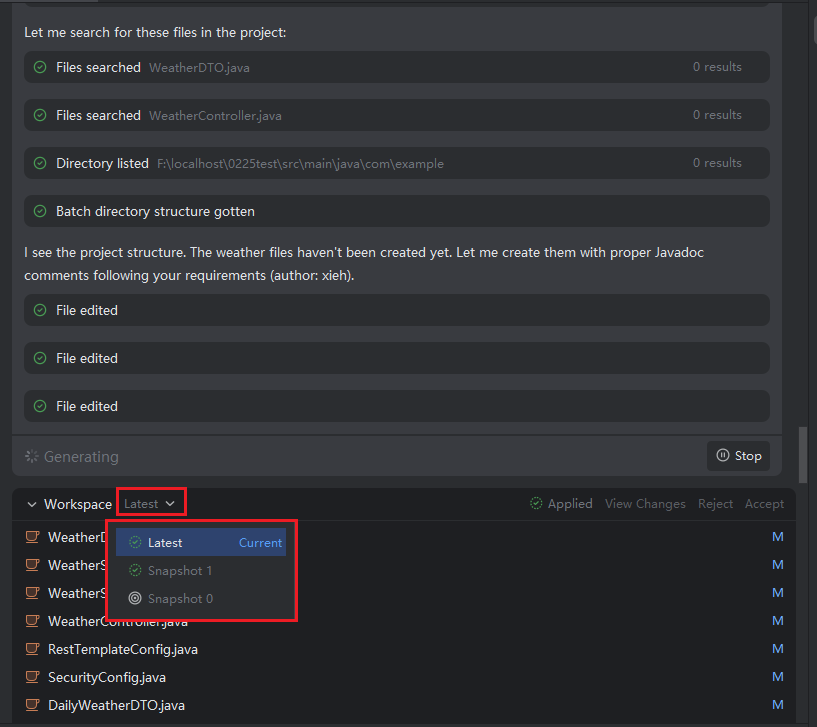
View Snapshots
Introduction
Each conversation with Java Chat automatically generates a snapshot, capturing the full context—including your request, the AI’s response, and any resulting code changes. Using the "View Snapshots" feature, you can quickly browse the content and metadata of any historical snapshot.
If you need to revisit or resume work from a specific point in time, simply switch to that snapshot—the conversation panel will automatically load its corresponding context. You can then refine your request, propose new optimizations, or continue development based on that state. This ensures a smooth, traceable workflow while maintaining clear version history.
Viewing Snapshots
- During interaction with Java Chat, every conversation round creates a new snapshot, which is saved as part of your session history.