Query Enhancement
Introduction
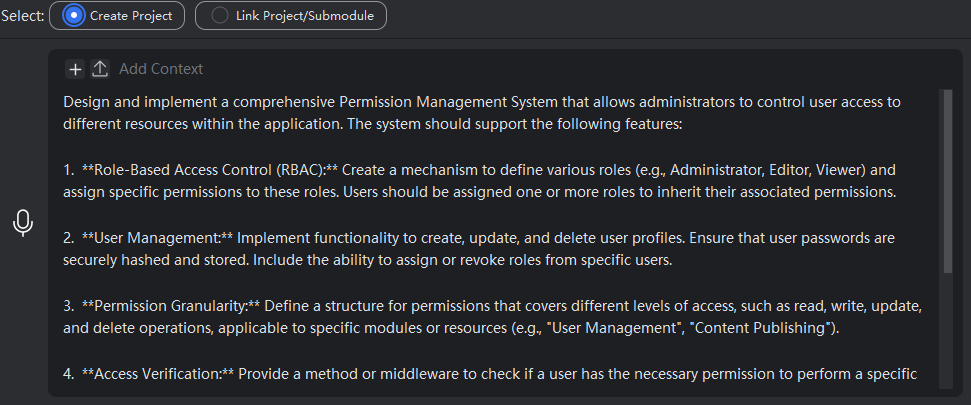
After entering your requirement or question in the input box, click the “Enhance” button on the right side of the mouse cursor. The model will perform deep understanding and structured refinement of your input, then provide you with more precise generation results.
It optimizes the input content from the following dimensions:
Requirement Clarification: It identifies vague descriptions and transforms them into specific, executable tasks. For example, inputting “book management system” will be enhanced to “Please help me implement a complete book management system based on the current project structure, with the following specific requirements: …”
Contextual Relevance: It incorporates key contextual information—such as your current project structure, conversation history, and associated context—as additional input, making the enhanced prompt more targeted.
Constraint Completion: It automatically adds critical constraints that developers often overlook, such as performance requirements, boundary conditions, error handling, security considerations (e.g., SQL injection prevention), and coding standards (e.g., PEP8).
Structured Output: It organizes the enhanced prompt into clear sections, such as “Task Objective,” “Input/Output,” “Constraints,” and “Reference Examples,” enabling the model to parse and execute the request more accurately.
Query Enhancement
- In the input box, enter your requirement and then click “Enhance”.
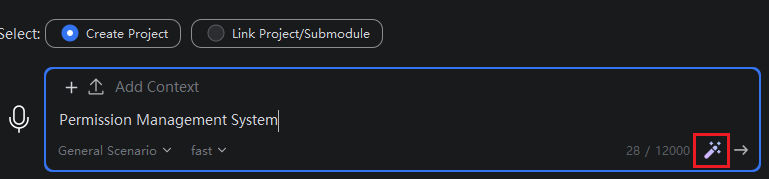
- Review the enhanced content in the input box to verify its accuracy. If needed, you can modify it. To revert, click the “Undo” button.