
Code Repository Index Ignore Files
Introduction
When performing code repository index searches, you can customize files to be ignored. Ignored files will not appear in search results. If the current project has already completed intelligent analysis, newly configured ignore rules will not take effect for existing files—they only apply to newly added files.
Code Repository Index Ignore Files
- In Advanced Settings, check "Enable Code Repository Index Ignore Files," then click the "Edit" button next to the file.

- In the file, enter the names of files to ignore—for example, *.yml to ignore such configuration files—then save the file. For detailed syntax rules, see below.

- In an intelligent conversation, ask a question using #code_repository to search for file content; ignored files will not appear in the search results.
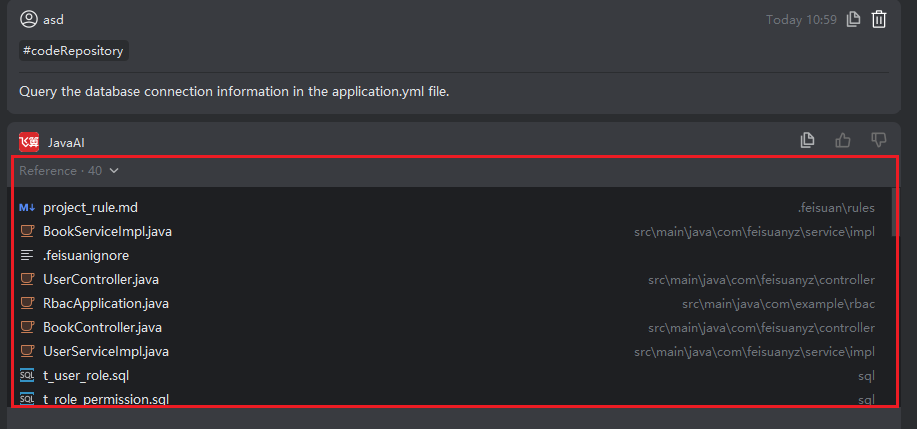
Rules for Writing Ignore Patterns
- Comments Lines starting with # are comments and will be ignored:
# Ignore all log files
*.log- Ignoring Files or Directories
filename: ignores a file named filename.
dirname/: ignores a directory named dirname (adding / at the end is clearer).
*.txt: ignores all .txt files.
**/temp/: ignores temp directories at any nesting level (** matches arbitrary nested paths).- Wildcards
*: matches any number of characters (excluding /).
   Example: *.tmp matches a.tmp and data.tmp, but not dir/file.tmp (unless covered by a subdirectory rule).
?: matches a single character.
   Example: file?.txt matches file1.txt and fileA.txt.
[abc]: matches any one character within the brackets.
   Example: file[0-9].log matches file1.log through file9.log.
**: matches any level of subdirectories (requires Git 1.8.2+).
Example: **/*.class ignores all .class files in any subdirectory.- Negation (Exceptions) Prefixing a pattern with ! means "do not ignore" (i.e., explicitly track), overriding prior ignore rules:
*.log        # Ignore all .log files
!important.log  # But still track important.log
Note: If a parent directory is already ignored, you cannot restore its subfiles using !. For example:
node_modules/     # Entire directory is ignored
!node_modules/special/ # ❌ Invalid! Parent directory is not tracked- Path Syntax
No leading /: Rule applies at all levels.
Example: temp/ ignores temp directories both in the project root and in any subdirectory.
Leading /: Matches only contents directly under the project root.
Example: /temp ignores only the temp file or directory at the root, not src/temp.
二、Common Examples Ignoring OS/editor-generated files
# macOS
.DS_Store
.AppleDouble
.LSOverride

# Windows
Thumbs.db
ehthumbs.db
Desktop.ini
$RECYCLE.BIN/

# Vim
*.swp
*.swo

# JetBrains (IntelliJ, PyCharm 等)
.idea/
*.iml
Ignoring build artifacts
# Java
*.class
target/
build/

# Python
__pycache__/
*.pyc
venv/
.env

# Node.js
node_modules/
dist/
npm-debug.log*
Ignoring sensitive files
config/secrets.yml
*.key
*.pem
.env.local