File Status
Introduction
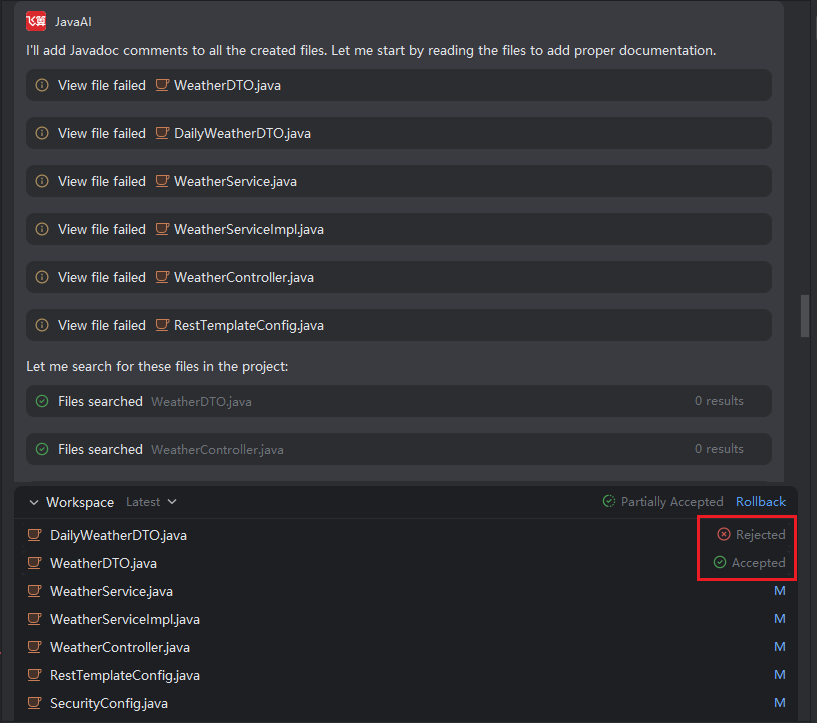
The snapshot status and file status in the workspace provide clear visibility into the current state of each file, helping you track modification history and understand which changes have been accepted, rejected, or remain pending. This transparency ensures better control over your code evolution process.
File Status Explanation
- All code modifications generated from the current snapshot are managed collectively. When you accept or reject changes in the workspace, the action applies to all related updates in a batch.
- Accepting a code segment or an entire file merges those changes into the original file.
- After processing all changes (i.e., accepting or rejecting every file), the snapshot’s overall status is updated as follows:
| Status | Condition |
|---|---|
| Accepted | All file changes in the snapshot have been accepted. |
| Partially Accepted | Some files were accepted, while others were rejected. |
| Rejected | All file changes in the snapshot have been rejected. |
| No Status | The file has not yet been reviewed—no accept/reject action performed. |