Describing Requirements in Plain Text
Introduction
Simply input your requirements clearly and thoroughly using natural language. The intelligent guidance system will perform in-depth analysis to accurately capture and implement your intent. Additionally, you can flexibly choose to generate the current requirement as an independent project for compilation, or associate it with an existing project.
Entering Requirements
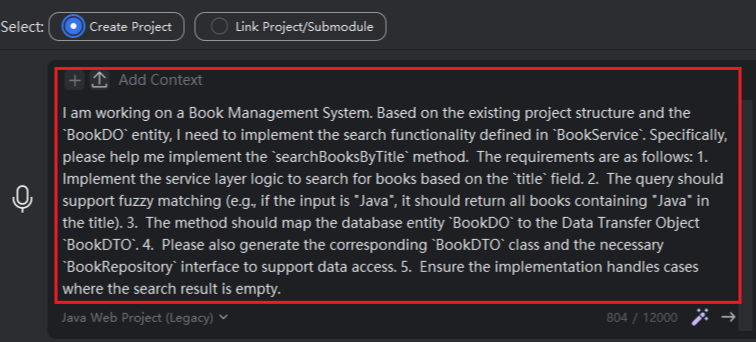
Directly input your requirement description using natural language, as shown in the figure.
Choose whether the current requirement should “Create a Project” or “Link to Project/Submodule”, select the model type, and click “Send”.
Note on Linking to Project/Submodule: You can only link to a project that is already open in the current window. If you need to link to another project, you must first open that project, then use FeiSuan JavaAI to generate the corresponding requirement. “Submodule” refers only to modules under the current project.